What You Can Inherit From AWS in a SOC 2 or HIPAA Audit, and What Stays Yours

Your cloud provider already handles physical security and much of the infrastructure, and you can point to its report for those controls in a SOC 2 audit or a HIPAA review instead of building and evidencing them yourself. In your own SOC 2 report they appear as complementary subservice organization controls. How you configure and use the services stays yours.
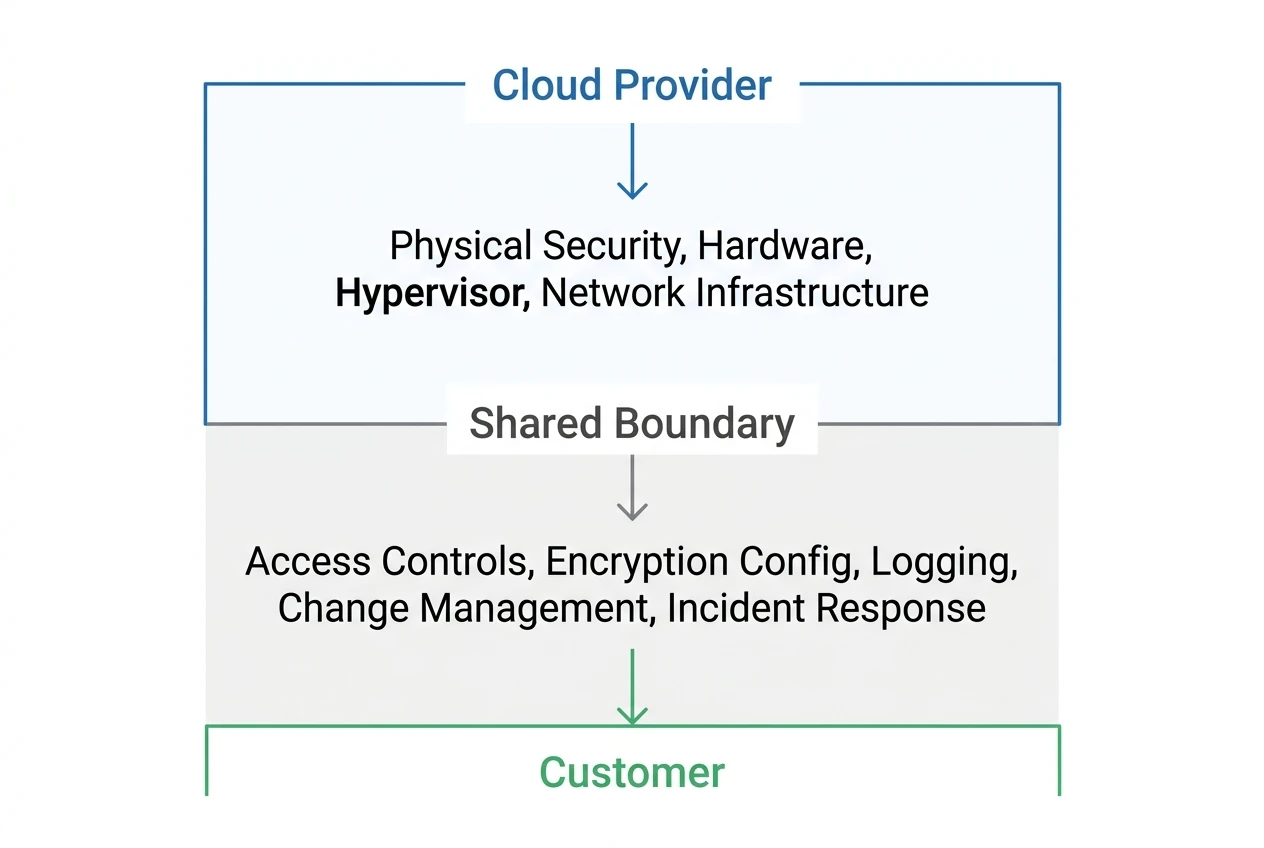
The provider's SOC 2 report describes the controls it operates and lists the ones it expects you, the customer, to operate. That second list is the complementary user entity controls. Access management, encryption configuration, logging, change traceability, and failure detection are all yours, even if the service runs on someone else's servers.
Key Points
- When your cloud provider holds a SOC 2 Type 2 report, you can rely on it for physical security and hypervisor-level controls. But the provider's report also lists complementary user entity controls that you must operate yourself, including access management, encryption configuration, logging, and change traceability.
- When AWS, Google Cloud or Azure is your subservice organization, your SOC 2 report usually uses the carve-out method: the provider's controls are excluded from your report's scope, and your auditor tests your own controls, including your oversight of the provider.
- Your auditor expects you to obtain and review each subservice provider's SOC 2 report at least annually. If the provider's report period does not match yours, you need its reports plus the bridge letters for any time after its latest report ends, so together they cover your full audit period.
- For HIPAA, the Business Associate Addendum (BAA) you accept with AWS covers the provider's obligations for infrastructure-level protections. You still handle access controls for your application, encryption decisions, audit logging, and breach notification procedures. Only services on AWS's published list of HIPAA-eligible services fall under the BAA.
- Adding a subservice organization during your observation period requires formal documentation, including a vendor inventory update, a reviewed SOC 2 report, and a risk assessment. Assuming the new provider's compliance reports speak for themselves creates audit gaps.
What are complementary subservice organization controls?
Complementary subservice organization controls (CSOCs) are the controls your own system's design assumes your cloud provider operates, such as physical security at its data centers. Your SOC 2 report lists them. When AWS, Google Cloud, or Azure holds a SOC 2 Type 2 report, that report is your evidence that the provider actually operates them.
Physical access to data centers, environmental protections, and hypervisor-level security: you don't need to replicate any of that.
Teams call these SOC 2 inherited controls, and AWS uses the same term for the physical and environmental controls a customer fully inherits. If the provider runs a control and its own auditor tested it, you point to its report for that control, and your auditor checks that you reviewed that report.
Where inheritance stops
The catch is that the provider's report also lists things you must do on your side. Every major cloud provider publishes a shared responsibility model.
AWS describes this split explicitly. AWS is responsible for the security "of" the cloud, and you are responsible for security "in" the cloud.
That means identity and access management, network configuration, encryption settings, and monitoring all stay with you. Your auditor will test those controls directly, and "we run on AWS" is not an answer they'll accept.
What the provider's report covers, and what it does not
A cloud provider's SOC 2 report is scoped to the services and infrastructure the provider operates. For AWS, that includes the global infrastructure (regions, availability zones, and edge locations), physical security, and the managed service layers the provider controls end to end.
It covers the services AWS lists as in scope for that report, which you can check on its services in scope page. How you use those services is outside it.
The split in practice
AWS offers server-side encryption for S3 buckets, and S3 now applies S3-managed encryption to new objects by default. The provider's report covers the encryption engine and key management infrastructure.
Which key type you use, who can use your keys, whether objects stored before that change are encrypted, and whether your policy enforces your choice for every bucket are your controls.
Same pattern with logging. AWS CloudTrail exists and the provider maintains it. Whether you set up a trail that covers all regions, whether logs feed into a monitoring tool, and whether anyone actually reviews alerts are all yours.
When a client added a managed database service in the middle of its SOC 2 audit, we sent the provider detailed questions before anyone relied on its compliance status. We asked about SSO versus standalone accounts, encryption key ownership, IP allow-listing, log access, backup retention, and data segregation.
Then came the client's own work: sign the DPA, and record the change with a design document, a change ticket and a risk assessment.
Carve-out vs inclusive: how your SOC 2 report treats the provider
When your SOC 2 report references a subservice organization like AWS or a managed database provider, it treats that provider with one of two methods: the carve-out method or the inclusive method.
For AWS, Google Cloud and Azure, the SOC 2 carve-out method is the usual choice.
| Method | What It Means | When It Applies |
|---|---|---|
| Carve-out | The subservice provider's controls are excluded from your report's scope. Your auditor tests your controls and your oversight of the provider. | The usual case for public cloud providers such as AWS, Azure and Google Cloud. |
| Inclusive | The subservice provider's controls are included in your report's scope. Your auditor tests them directly or relies on procedures performed at the provider. | Rare. Typically used only when you control the subservice organization or it's a closely integrated partner that agrees to direct testing. |
With the carve-out method, your report names the subservice organization, lists the complementary subservice organization controls your system assumes it operates, and leaves those controls out of testing. Along with your own controls, your auditor tests how you monitor the provider.
That usually means showing you reviewed the provider's own SOC 2 report for the audit period.
Understanding the difference between SOC 2 Type 1 vs Type 2 matters here, because a Type 1 report tests design at a point in time while a Type 2 report also tests operating effectiveness over a period.
You want the provider's Type 2 report, and together with its bridge letters it should cover your full observation period.
How complementary subservice organization controls appear in SOC reports
They appear in your own report: with the carve-out method, your system description lists the complementary subservice organization controls you assume the provider operates. The provider's SOC 2 report carries the list going the other way, its complementary user entity controls (CUECs). These are the controls the provider expects you, as its customer, to operate.
The provider designed its system assuming you'd hold up your end.
Common CUECs from cloud providers
The specific list varies by provider and report. Items like these are typical in cloud provider reports.
- You control who in your organization has access, enforce least privilege, and run periodic access reviews.
- You enable encryption for data at rest and in transit using the provider's available tools.
- You configure security groups and firewall rules appropriately.
- You enable logging services and build alerting so your team notices failures or anomalies.
- You trace changes to a person and an approval. The provider doesn't track your application deployments for you.
- You maintain and test your own incident response plan for events within your environment.
Your auditor will test whether you actually perform them.
The provider's system description lists them because the AICPA's description criteria for SOC 2 reports call for it, and your own controls are tested against the AICPA's Trust Services Criteria.
If you're mapping your full SOC 2 requirements, start by pulling the CUEC list from each subservice provider's report and turning every item into an internal control with an owner and evidence.
Reviewing a subservice provider's SOC 2 report
Your auditor expects you to obtain and review each subservice provider's SOC 2 report at least annually. This is one of the controls the carve-out method requires you to demonstrate.
Two checks come up again and again in our work: whether the provider's reports cover your full audit period, and how much access the provider has into your environment. Getting the report in hand can take work too.
Coverage gaps and bridge letters
A provider's SOC 2 report covers a specific observation period. If your audit period runs January through December but the provider's report covers April through March, there's a gap.
Providers issue bridge letters to cover the time after their latest report ends, and some providers issue several in a single year. Check the dates on each one. Together with the reports, they need to cover your full audit period, and when each letter covers only its own stretch, you need every one of them.
Getting the report itself
Not every provider makes this easy. During a combined SOC 2 and HITRUST engagement for a digital health company, we prepared the review of each subservice provider's SOC 2 report.
One database vendor's trust center refused us the report, because only customers can download it. The client downloaded it in minutes, and the SOC 2 Type 2 turned out to be filed under the name SOC 2 plus HITRUST mapping report.
Download each report early from your own customer account, because a portal that only serves customers may refuse whoever is preparing your evidence for you.
The auditors on that engagement also agreed to combine two related controls into one: subservice organizations and high or critical vendors reviewed annually, with the cloud provider always included.
All of it went to the audit firm on time.
Provider access into your environment
If the provider has API access into your environment, confirm its permissions are as narrow as possible and include that access in your own access reviews. This is part of the provider relationship that stays yours regardless of their compliance status.
Before relying on any provider's status, verify vendor certifications directly, and make reviewing vendor compliance documents a recurring task, at least once a year.
Want a structured way to track all of this? Download the free SOC 2 Readiness Checklist, 70 items in ten sections, including vendor and third-party management.
HIPAA: the BAA and the shared responsibility model
HIPAA works differently from SOC 2, but the shared responsibility concept is the same. When you store or process PHI on AWS, the Business Associate Addendum you accept in AWS Artifact sets out the provider's obligations under HIPAA.
Your own obligations, usually as your customer's business associate, stay with you.
AWS publishes a list of HIPAA-eligible services. Only services on that list fall under the BAA. If you use a service that isn't on the list for PHI workloads, the BAA doesn't apply to that usage, and you've created a gap.
What the BAA actually covers
The BAA sets out the provider's duties, as a business associate, to safeguard the PHI it holds in its infrastructure. The HIPAA shared responsibility model with AWS means they handle physical safeguards for their data centers and infrastructure-level protections.
You handle access controls for your application, encryption decisions, audit logging, and breach notification procedures.
A healthcare organization asking for your HIPAA compliance documentation will want to see your own risk assessment, your own policies, and your own evidence of technical safeguards. "We use AWS and they're HIPAA compliant" covers AWS's side only, so expect follow-up questions about what you did on yours.
Our HIPAA compliance work starts here: mapping the controls that stay with you and building the evidence your customers and their auditors expect.
Where teams over-inherit
A common mistake is assuming that a provider's compliance status covers more than it does.
Treating the provider's SOC 2 as a blanket
"AWS is SOC 2 compliant, so our infrastructure controls are handled."
AWS's report covers AWS's controls. Your auditor still tests your configuration of AWS services, your access policies, and your change management. If you haven't built and evidenced those controls, the provider's report doesn't help you.
Skipping the CUEC review
Some teams download the provider's SOC 2 report, confirm it exists, and stop there. The complementary user entity controls section is the part that tells you what your auditor will ask for.
Skip it and the gaps surface during fieldwork, when a control that did not run during the observation period cannot be fixed after the fact.
Ignoring new providers added mid-period
Adding a subservice organization during your observation period requires documentation. The new provider needs to be included in your vendor inventory, its report reviewed, and the change recorded.
Confusing a vendor with a subservice organization
Not every vendor is a subservice organization. A subservice organization is a vendor that performs controls your system relies on, together with your own, to meet your service commitments and system requirements. Sorting vendors into the right group is part of scoping, and part of our SOC 2 compliance services.
Your cloud provider and your authentication provider are likely subservice organizations. Your office supply vendor is not.
If you're unsure, ask whether the vendor operates a control you rely on to meet a Trust Services Criterion. If yes, it's probably a subservice organization and belongs in your report.
Frequently asked questions
What are the requirements for SOC 2 compliance?
SOC 2 requirements are based on the AICPA Trust Services Criteria and focus on how your organization designs and operates controls. In practice, that includes documenting your system boundaries, implementing controls that you own (including any complementary user entity controls from subservice providers), and, for a Type 2 report, producing evidence over the audit period that those controls operated effectively.
What is the difference between a SOC 1 report and a SOC 2 report?
SOC 1 focuses on controls relevant to financial reporting (ICFR), which matters most for companies that impact a customer's financial statements. SOC 2 focuses on the Trust Services Criteria (security and related categories), which is typically the better fit for SaaS and technology services where customers need assurance about security and operational controls.
What is a SOC?
SOC stands for System and Organization Controls, a set of independent assurance reports performed under AICPA standards. These reports help customers and auditors understand what controls a service organization has in place and, depending on the report type, whether those controls are designed appropriately and operating effectively.
How do you decide whether a vendor should be treated as a subservice organization in your SOC 2 scope?
Treat a vendor as a subservice organization when it performs controls that your system relies on, together with your own, to meet a Trust Services Criterion. A practical test: if you took that vendor's controls away, would one of your criteria go unmet? If yes, it is a subservice organization and your report should name it. A vendor that matters but runs no control for you belongs in vendor management instead.
What evidence should you keep to prove you reviewed subservice organization SOC reports, beyond just saving the PDF?
Keep a short review record that shows who reviewed the report, when, what period it covered, and what exceptions were noted. Also retain supporting artifacts like your vendor risk assessment update and a record of management sign-off or ticket closure.
How should you handle subservice provider changes during the audit period without creating a scope or evidence scramble?
Use a lightweight change-intake workflow that triggers compliance tasks whenever a new provider or major service is added. At minimum, require a security review before purchase, an updated vendor inventory entry, and an implementation plan that assigns owners for any customer-side controls introduced by the provider.
Map your controls and close the gaps
Under the carve-out method, your cloud provider's physical and infrastructure controls stay out of your auditor's testing, and its SOC 2 report is your evidence for them.
But the controls that remain, starting with the complementary user entity controls listed in each provider's report, are yours to design, operate, and evidence.
Map each CUEC to an internal control owner.
Collect the evidence for each one as the work happens, so it covers the whole observation period.
Build the controls that stay with you
If you're preparing for a SOC 2 or HIPAA assessment and want help mapping what you inherit versus what you own, talk to an expert at Cycore. Cancel anytime. If you're not saving 100+ hours, you don't pay.
Free resource
SOC 2 Readiness Checklist
70 items in ten sections. Score yourself, find the gaps, assign owners, and bring the list to your auditor.